Samsung gave us Galaxy Note 10.1s as Christmas presents, so in the spirit of trying out the company hardware (I usually use an iPad 3 as my go-to 10″ tablet) I’ve been using it as my primary tablet for the last two weeks. Overall I like both the hardware and software more than I expected, but the Android tablet ecosystem is still pretty sparse compared to the iOS tablet ecosystem.
I was initially a bit concerned about the Note’s build quality; I’d read a number of reviews claiming that the plastic back was too compressible. Either the reviewers were exaggerating, there were initial build quality control issues that Samsung straightened out, or my fingers aren’t that strong, but I found the case sufficiently rigid. The hardware is also plenty fast, and the stylus very responsive when used for input (although since I’ve been off work for most of the last two weeks I haven’t used it much for taking notes yet).
I found two advantages to the Note hardware over the iPad 3, both linked to the choice of plastic for the body over aluminum. First, the Note is lighter, so it’s a bit easier to hold for sustained periods. Second, the Note is more comfortable to hold in winter; I find the iPad’s aluminum enclosure somewhat chilly when you first pick it up on cold days.
However, the iPad 3 has its own advantages. I like the 4:3 aspect ratio better than the 16:9 aspect ratio of Android tablets (I use tablets much more for reading than for watching movies, and the 16:9 aspect ratio is awkward for reading long-form content. The iPad 3 is also a retina-quality display, while the Note 10.1 is not. And I hadn’t realized how much I took it for granted until I went without it for a couple of weeks, but the automatic wake-sleep behavior you get with a Smart Cover on the iPad is just freakin’ awesome. Who knew how annoying it could be to have to press the power button to start and stop using the device?
On the software side, Android as an operating system is getting close to par with iOS these days (although I still wish it was better at power management). But the application ecosystem is still pretty lousy in comparison to iOS. The built-in email client is pitiful. The New York Times app is designed for Android phones, as is the Facebook app. The Twitter app also appears to be a scaled up smartphone app, but it’s hard to tell (the iOS Twitter app is more or less a scaled-up iPhone design as well, since Twitter back-tracked from Loren Brichter’s more interesting tablet design). I couldn’t find a task management app on par quality-wise with Things. And Amazon doesn’t yet have a version of their Instant Video app for Android.
I did manage to find fairly good equivalents of two iOS apps that I commonly use. Marco Arment worked with Mobelux to create a version of Instapaper for Android that’s decent. And I finally found a decently designed RSS reader for Android: Press.The fine folks at TwentyFive Squares may have drawn inspiration from Reeder, but I’d count that a good thing.
Google likes to tout the number of applications in the Android ecosystem, but to my mind a better measure of the quality of an ecosystem is how many of the best applications aren’t built by the ecosystem creator. Most of the best Android experiences are still built by Google. Contrast that situation with iOS, where most of the best iOS experiences are not built by Apple (although they do build some fine applications). I have some theories as to why the quality of Android apps continues to lag that of iOS apps, but that’s a post for another time.
In summary, my two weeks with the Note 10.1 went better than expected. I’ll be bringing my iPad back into my regularly used devices, but the Note and associated apps are of sufficient quality that I’ll keep them as part of the mix.
We traveled down to San Diego between Christmas and New Year’s to spend a few days checking out the sights. Kate and I had been to San Diego before and visited the Safari Park back when I interned at Disney Imagineering in 1999, but we didn’t make it to the zoo or SeaWorld. And we hadn’t yet taken Anna down to San Diego, so it seemed like a worthwhile trip.
When figuring out how to travel, we went back and forth between driving and flying. Flying is more expensive but faster, while driving provides an opportunity to see more of the country and is significantly cheaper but takes significantly longer. In the end, we figured we weren’t in a hurry, we wanted a car to get around San Diego anyway, and it’d be fun to see some of the country in between, so why not drive?
One thing I remember from living in LA for 5 months: you can get traffic jams anywhere, at any time, for no apparent reason. And sure enough, when we got to the LA sprawl we ran headlong into traffic. Google Maps optimistically suggested it’d take a bit over 7 hours to travel the 471 miles, but it was actually more like 10 by the time we actually made it to the hotel (by contrast, we barely hit any traffic on the way back and made it back it something closer to 8.5 hours). The trip wasn’t awful (thank heavens for audiobooks borrowed from our local library for helping to keep our daughter entertained), but I think we’ll lean heavily toward flying and renting a car next time.
For our stay in San Diego we opted to stay in the Hotel Solamar, both because it was conveniently located in the Gaslamp District relatively close to both the zoo and SeaWorld. While there are disappointingly few gas lamps in the Gaslamp District, there are a ton of good restaurants within a short walk.
We hit SeaWorld our first day, in large part because one of Anna’s friends was also in San Diego that day and was also visiting SeaWorld with her family. So the two of them ran around together catching rides and shows. I was the only one brave enough to sit with them in the splash zone of several shows, so I don’t have too many pictures (I gave my smartphone, wallet, and everything else that didn’t play well with water to my wife to carry; I’m glad the day was pretty sunny…). But I did sneak in some during a few of my drier moments.
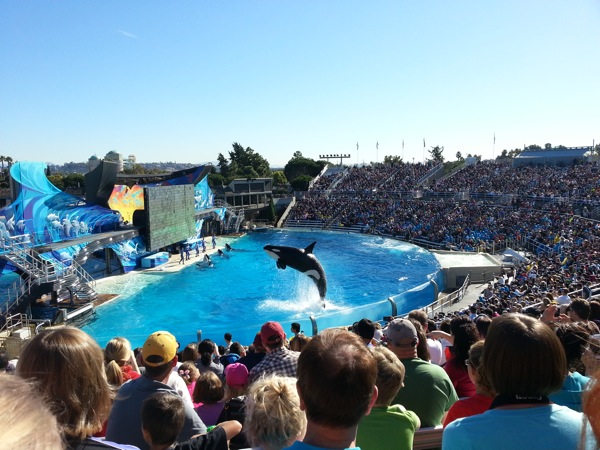
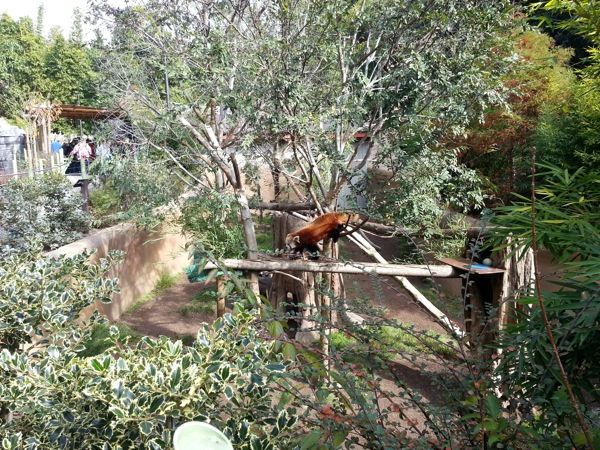
The next day we hit the San Diego Zoo, which was indeed impressive. It’s definitely the largest zoo I’ve been to, both in physical size and in the number and variety of animals they had. We spent the whole day walking around and checking out the exhibits, even during a few afternoon showers (thankfully we had packed a hotel-provided umbrella and my rain coat). I think my favorite exhibits were the red panda (which I personally find much cuter than regular pandas) and the mountain lion (which was clearly checking out the babies in the crowd to try to figure out which one it should try to consume first).

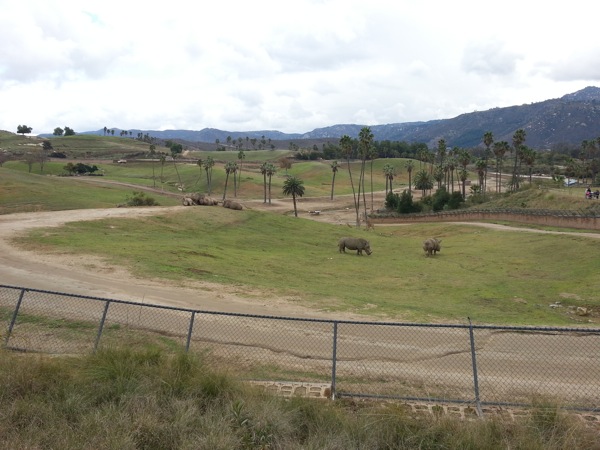
We visited the Safari Park on our last day. One of the things I remembered from our 1999 trip and was reminded of again on this trip was how much more I like the Safari Park than a regular zoo, in large part because most of the animals have much more space to move around in. Even in the San Diego Zoo, which is world-renowned, many of the animals are restricted to relatively small spaces. But in the Safari Park, they have a couple of valleys to move (and run) around in. I particularly liked seeing the crash of rhinos (the first time I’ve seen enough clustered rhinos to merit actually calling them a crash) and all the newborn animals (the zoo has roughly one animal born a day, and on our second ride on the tram we saw a Cape Buffalo that was roughly an hour old).
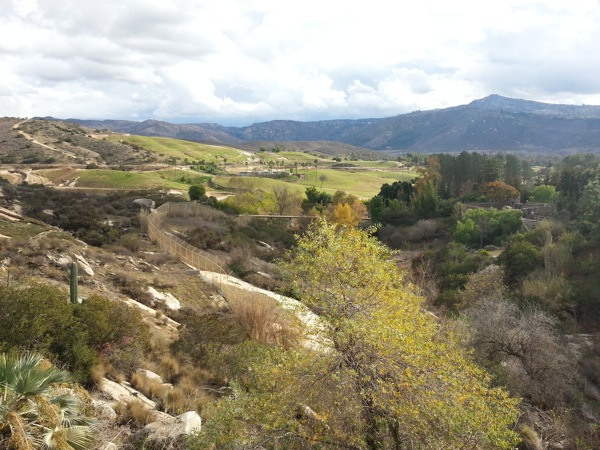
One other cool but weird thing: seeing the circling swarm of turkey vultures throughout the day. Made me wonder what they knew that we didn’t…

All in all the trip was a lot of fun, if not quite as sunny as we’d hoped (the weather hovered more in the 50s than 60s, although luckily we chose to visit SeaWorld on the sunniest day). We’ll definitely be back, but next time I’m voting to check out the USS Midway.
Today I completed the last run of the Zombies, Run! 5k Training app. Course. Thing. Whatever. 8 weeks, 24 sessions, and according to the distance tracking some 93 miles. Overall the app was very well done, as was the training regimen itself (witness the fact that the combination of the two got me all the way through).
I will admit to one minor complaint. Today’s session, the last, was nominally a 5k run to cap the 5k training. Obviously. I of course assumed that the session would be tracking distance, since, y’know, 5k, and that the 51 minutes time displayed for the session was an upper bound estimate. Nope. Turns out the session was just tracking time, so my final 5k run was more like a 7.5k run. But I can’t complain too much, since the training was good enough that I completed a 7.5k run without any problems. I will confess to wondering if the app was ever going to call an end to the “5k” around mile 4 (km 6.4ish), but it eventually did.
Now it’s on to the main Zombies, Run! app. The zombie hordes await!
It was cold in Suwon this past week. In point of fact the weather was comparable to winter weather in New York, but sadly I have become a weather wimp. I blame California. After living in the Bay Area for 6+ years I’ve forgotten how good we have it. People in other locations can’t bike to work in December because there’s snow and ice on the ground. People in other locations have to check the weather to determine whether to bring an umbrella. People in other locations have to wear gloves, hats, and scarves as a matter of course in the winter, not just when they take a vacation in the mountains. I am glad I am not one of those people.
I realized one other winter-related tidbit on this trip. While I have in the past gently made fun of the popularity of incredibly fancy toilets in Asia, I must confess that heated toilet seats are sheer genius in cold weather.
I just got back from another visit to Samsung’s Digital City in Korea. I’ve noticed that as I acquire more and more devices (a side-effect of both enjoying gadgets and being specifically interested in how people use collections of devices) it becomes a more difficult decision which devices to bring with me when traveling.
Travel overseas is a particularly unusual case, since I don’t have an international data plan for either of my devices. That means whatever personal cellphone I have on me becomes much less useful once my travel starts, mainly being restricted to use on the hotel’s WiFi. Samsung supplies us with loaner phones that work in Korea so in theory I wouldn’t actually need to bring my personal phone, but in practice I’ve been leery to forgo bringing either my iPhone or my Galaxy S3. Although less useful without a cell connection, both store enough cached data that they’re still useful.
International travel is an interesting use case for two other reasons. First, the flights are extremely long. The flight from San Francisco to Incheon is around 13 hours, while the return flight is roughly 10 hours (gotta love tail winds). That means that most tablet batteries won’t be able to last the entire flight.
Second, content isn’t always available overseas. That means no Amazon Instant Video, for example. And I was surprised to note that the set of my installed apps I could see in Google Play was roughly 25% smaller overseas. The former has the most impact, however, since it means that my Kindle Fire is much less useful overseas (I’m an Amazon Prime member, so I get access to a lot of Instant Video content free.
This time I decided to bring the following devices with me:
- My work laptop. Necessary to get work done while traveling.
- My iPad. I went back and forth on whether to bring the iPad or the Kindle Fire. The Kindle Fire is smaller and I prefer reading off of it, but the iPad has a better battery and is a better device for accessing my personal email, news feeds, etc. I tend to prefer the iPad for watching downloaded movies too, but since international flights tend to have a number of videos available that I haven’t seen I find I don’t watch movies off my iPad while flight internationally as I do while flying within the US. If I could have accessed Instant Video I might have gone the other way, but I can’t access it in Korea.
- My Kindle Paperwhite. I’m not a big fan of reading on the iPad (too big, too heavy, wrong weight distribution for one-handed reading), and since I decided to bring the iPad rather than the Kindle Fire I wanted something better suited to reading. I did briefly consider bringing the Kindle Fire and the iPad, but the Kindle Paperwhite battery blows the Kindle Fire’s battery away, so I wouldn’t need to worry about even bringing a charger for it (let alone worry about it running out of juice on the flight). And the Paperwhite’s battery did indeed come through. I read a lot on both flights, while waiting for the flights, and in the evening at the hotel, and the Paperwhite’s battery is still almost full.
- My Galaxy S3. I wanted to see what it was like bringing it instead of my iPhone, which I usually bring. A couple of times I did miss having more of my music collection with me (my S3 has a much smaller subset of my music), but I also appreciated having the larger screen a number of times.
I ended up using all of the devices I brought with me for different tasks at different times, but I must admit that I felt a little silly hauling them around. I’m tempted to try bringing just three devices on my next trip: my work laptop, the Paperwhite, and my S3. I need the work laptop, the Paperwhite suits the reading task admirably, and the S3 has a large enough screen that I might be able handle all of my personal computing tasks with it. Just as a long as I don’t to send any long email messages. That’ll leave me dependent on the airline for movie entertainment, but that worked fine on this past trip. Now if there was just a better RSS reader for Android; access to Reeder is a primary reason to bring an iOS device.
When I worked at IBM Research they would periodically encourage us to find projects that we might collaborate on with the telecommunications companies (AT&T, Verizon, T-Mobile, etc.). The telcos were convinced that their customers were looking to them for innovations and they were fundamental to shaping the future of mobile computing.
My take was somewhat different. I think the telcos are deathly afraid of becoming bitpipes, and they were frantically trying to find some means to differentiate themselves for their customers. Because their customers aren’t expecting innovations. Heck, they’ve even largely given up expecting quality services from the telcos. When was the last time you met someone with a high opinion of their carrier? The telcos are afraid of becoming lowest cost providers of wireless internet service, but they’re not even particularly good at providing that service.
While some folks are starting to think that Apple is getting too big and too powerful, one thing I really appreciate about Apple is that the iPhone provides enough leverage that Apple can largely dictate terms to the carriers. That means no crapware carrier software, and it means that Apple dictates the availability of software updates.
For several years I took the latter for granted, but since I joined Samsung I’ve been splitting my time between a Galaxy S3 and my old iPhone 4. The latter still works awesome and is running the latest and greatest version of iOS. The former is still stuck on Ice Cream Sandwich because AT&T is apparently incompetent at providing updates to its customers.
Of course, it’s not terribly surprising that the carriers, in this case primarily US carriers, suck at providing timely software updates. Since they can’t really compete on customer service, their main way to retain customers is to lock them into contracts. And if you keep updating your customers’ devices to the most recent OS versions they might not need to buy phones as often, and then where would you be? You might actually have to compete on the quality of your service. And the telcos certainly don’t want to go there.
I just completed my sixth week of the eight week training course in Zombies, Run! 5K. And I completed the last run of week six in a drizzle because the weather looks rainy through Sunday, I really wanted to close out the week’s training, and the drizzle might be the best weather I got.
So needless to say (but I’m obviously going to say it anyway) I’m a big fan of the app. The story is interesting and the training course surprisingly good (the app creators apparently partnered with Up & Running to create the training program). The story keeps you coming back and I’ve found the training great at building up strength and endurance without overworking you. You know you’re hooked when you decide it’s worth running in the rain (ok, drizzle), something I will admit I have made fun of people for in the past (what kind of idiot runs in the rain when they could just wait for drier weather?).
I will sadly note that getting back into running has made me feel a bit old. When I started running in college I don’t remember as many aches and pains and sore muscles. I’ve occasionally felt more than a bit stiff the day after a session (although luckily running and biking work enough different muscles that I haven’t had trouble biking to work on following days), although by the second day I’m generally recovered and ready for another session. But it’s a small price for the extra exercise, and will presumably be less of an issue once I’m maintaining more than increasing my fitness.
I have learned one other thing from the training program: avoid eating just a salad for lunch on days when I run (I typically run after work). I have a noticeable harder time on 4+ mile courses on days when I haven’t had more protein for lunch. And I’ve observed that before, and yet somehow still managed to eat only salads on my two running days this work week. I am smooth.
Google added a new section to the Android SDK licensing terms this week (CNet’s coverage). The new section reads:
3.4 You agree that you will not take any actions that may cause or result in the fragmentation of Android, including but not limited to distributing, participating in the creation of, or promoting in any way a software development kit derived from the SDK.
I find this section interesting (and hypocritical, but that’s another post). What’s the problem Google is trying to solve? People still stuck using older versions of Android because of poor support by device manufacturers and carriers for older devices? When people lament Android fragmentation that’s often what they mean, but that’s not developers’ fault.
Are they trying to stop device manufacturers from modifying the stock version of Android? In theory you could read those terms to mean that developers are prohibited from using the SDK to build apps that work better on one device than another. Is it fragmenting Android if a device manufacturer extends Android in some way and a developer builds an app that uses that extension? But if that’s the problem Google is tackling why not either (a) change the terms it works out with device partners to prohibit changes or (b) just close the Android source moving forward?
The most likely conclusion seems to be that they’re worried about Amazon. Amazon is also making tablets (and may be making a phone) by taking and branching the Android source code, but they’re confining the changes so that Android applications run fine on their tablets. You could read these terms as a play by Google to stop developers from building apps for Amazon’s tablets, since that would be contributing to fragmentation. And it could also be an attempt to deter others from following Amazon’s path.
It’ll be very interesting to see whether and how Google tries to enforce these terms against developers. And whether they’ll still try to insist that Android is open while doing it.
After half a year of riding my bike and taking light rail to work there are noticeable patterns on the northern part of the Mountain View-Winchester VTA line. First, there appear to be at least three clear clusters of riders. One group travels between Mountain View and Lockheed Martin or Yahoo! and tends to be somewhat older. A second group is much younger and travels between Fair Oaks (where there’s a concentration of condos and apartments) and Cisco (or at least the Tasman light rail stop; they may be transferring to an Alum Rock train). And the last group gets on/off at Tasman, and I have no idea where they go (presumably nearer to downtown than I get). I find it interesting that the groups are so distinguishable; I would’ve expected more blending across them.
The second pattern is around bike riders on light rail. I was expecting the number of bikers to drop noticeably when daylight savings time kicked in, but actually ridership has stayed relatively steady (despite the fact that some bikers do not appear to have lights on their bikes; those folks are nuts). I’m still waiting to see what happens when it gets significantly colder, but even some mornings in the 40s haven’t appeared to deter folks. I’m assuming ridership does decline drastically when it rains, but I can’t verify since I don’t bike when it rains either.
I have noticed two ways the changing weather has impacted riders, however. On days when it’s noticeably warmer (e.g., low 70s) this fall I’ve seen more riders, individuals that are noticeably separate from the usual folks that I see most days. Surprisingly (to me at least), I’ve also noticed that some colder mornings also draw riders apart from the usual crowd (and also different from the warm weather crowd). My working theory is that these folks prefer biking on colder mornings because they’re less likely to get sweaty biking into work, but I haven’t actually asked any of them yet.
Overall I’ve been pleasantly surprised how many bikers are sticking with it even after the time change. I’ll confess that I was a bit leery about biking home in the dark, but most roads are pretty well lit and drivers remain pretty polite to bicyclists. So I’m sticking with it too (although it remains to be seen if I wimp out when the temperature drops another 15-20 degrees).
While I’m on the subject of self-published authors, I should also give a quick shout out to Michael Sullivan. I discovered his Riyria Revelations series (6 books long) largely by accident. I picked up the second book in the series, Avempartha, when it was free on Amazon. I later found the first volume at the local library, and have since worked my way through the series.
Similar to Hugh Howey, Sullivan self-published his series on his own, and it later achieved enough success that Orbit offered him a book deal. The series is now available as a set of 3 books (each containing two of the original books). And Sullivan is apparently also working on a prequel that will appear next year.
While Wool is science fiction, the Riyria Revelations is classic fantasy. It shares a surface similarity to other “buddy stories” fantasy (I’m reminded a bit of Leiber’s Fafrd and the Grey Mouser, the classic warrior + thief series), but it’s very much its own story. Worth checking out if you enjoy the genre.
 jeff pierce