I bought Wool (the Omnibus edition, containing books 1 through 5) by Hugh Howey on the recommendation of a colleague at work. The premise, as he explained it, was intriguing: thousands of people live in a silo over 100 levels deep in the earth, their only view of the world outside relayed from cameras aboveground. The cameras show a blasted world where nothing remains alive. The people are trapped in a sense, but they can also leave at any time: all they have to do is express the desire to leave the silo and they are sent outside. But once they leave, they can’t return, and everyone sent outside appears to die on the surface not far from the silo. But first, every person sent outside cleans the camera lenses. No one is quite sure why; even people sent outside who vow not to clean the lenses do so.
That hook was enough to get me started, and the books themselves turned out to be extremely entertaining. I later learned that Howey directly published the first book himself on Amazon, and readers and reviewers were enthusiastic enough that he kept going. Since then he received a book deal for the Omnibus edition, it made it onto the New York Times best seller list, and he’s apparently sold the movie rights to 20th Century Fox. Not bad for someone who published Book 1 as a short story on his own.
Howey has published Book 6, a prequel to Books 1-5 on Amazon, and according to his website he’s using NaNoWriMo to work on the next books. I’m looking forward to finding out what happens next.
I finally made time this weekend to subscribe to Marco Arment‘s new Newstand app The Magazine. Just like The Magazine is an experiment with curating content for tablets (and smart phones, although I’d argue The Magazine is better suited to reading on tablets), my subscription is a bit of an experiment as well. I’m not sure I’ll stick with The Magazine long-term, but if I don’t it’ll be due to the content itself rather than the form. I actually really like the form: clean, simple, elegant. And I like what Marco did with embedded notes and links.
The content so far is quick to read. I made it through Issues 1 and 2 in less than an hour. If The Magazine brings in enough money I expect Marco will expand the amount of content over time, but I think the current amount of content is sufficient to get started. The first 8 articles were good but not great; I didn’t find them particularly thought-provoking. I expect the range and quality of articles will improve as Marco can cast a wider net for content, rather than needing to keep it close to the vest while developing the app. And in the end my main criteria for deciding whether to stick with my subscription will be whether I decide the writing is worth the investment in reading time, not whether I decide it’s worth the $2 monthly investment. Because let’s face it, $2 a month is noise. It’s worth it to me to subscribe in the short term as an investment in the experiment in hopes that it grows into something with content I eagerly anticipate reading. It’s kind of like a slow Kickstarter for the next generation of magazines.
Oh, and the lack of ads is awesome.
One of the more annoying aspects of business software is the password expiration reminder. You know the one. “Your password will expire in 14 days, would you like to change it now?” The reminder would not be nearly so annoying if:
- Your password wasn’t expiring every 3 months already. Changing your password 2 weeks early if it lasts a year? Not a huge deal. Changing it early when 2 weeks is roughly 15% of your allotted time? Not gonna happen.
- The system would either apply a decreasing backoff (e.g., 1 week, 3 days, 1 day) or allow it to tell you when to remind you again (including never). But sadly these systems insist on reminding you every… single… day… until you finally change it.
IT departments could lengthen their password duration periods (which would also solve other problems), but somehow I don’t see that happening. In fact, the trend seems to be the reverse: shorter and shorter password periods. Perhaps eventually the password period itself will reach 2 weeks, at which point every day can yield a new password change reminder.
Or software developers could check to see whether you’ve already acknowledged a password change reminder and realize that if there’s more than a day or two to go you probably don’t need another reminder right away. Because as hard as it might be to believe, some people don’t change their passwords as soon as they’re reminded.
We’re heading into the rainy season for Silicon Valley (which really just means that it occasionally rains, not that it actually rains a lot), so I’m not going to be able to bike to work as much as I have for the last few months. Case in point: it was raining this morning so I ended up driving, and there’s rain in the forecast for the next couple of days. Since I’d like to still get exercise on work days I’ve been considering alternate workouts. Running was the obvious candidate; I ran in college for several years (running along the Rock Creek Parkway was always my favorite). However, it’s been more than a decade since I ran regularly, so I was leery about how hard it would be to get back into it.
What finally pushed me to take up running again was the release of Zombies, Run! 5K Training. I’d heard of Zombies, Run! previously and thought it sounded like fun, but it presumed that you were already a runner. Zombies, Run! 5K Training is a structured training course that takes you from couch to 5K, so I figured it would be a more gentle re-introduction to running.
The basic premise is just what it says on the box: the zombie apocalypse has happened, and you’re running to collect supplies and escape zombies. There’s a broader story that goes with that basic framing, but I’ve only gone through 2 runs thus far so I’ve only encountered the edges of it. My impression after 2 runs is that the story and technical execution are both pretty well done. You can track your progress through the story and your exercise results through the game website. I can’t vouch for the calorie expenditure numbers, but the GPS tracks are very good so I give them the benefit of the doubt. The voice acting is good, and the app does a nice job of overlaying its audio over your own music. And the story is fun: I’m definitely motivated to keep running to see what the next episode brings.
I’ve been skeptical of exercise games in the past (running with physically and/or temporally distributed people doesn’t appeal to me that much, and I find just tracking my runs insufficiently interesting by itself), but I think Zombies, Run! might have hit the sweet spot for fun and exercise. Running for your health? Good, but not necessarily something that gets you to lace up your shoes at 6 AM. Running to enjoy being outdoors? I can do that on a bike (and get further and see more). Running to escape from the oncoming zombie hordes? Sign me up.
While I’ve owned and used a Kindle Fire regularly for almost a year, I’ve always had a fondness for the e-ink Kindles. I bought a 1st generation e-ink Kindle when Amazon first released them, and I used it regularly for years. I did nearly stop using it when I bought the Kindle Fire, but that was in part because the battery on the Kindle 1 had trouble holding a charge (I was lucky to get a few days of reading time out of it, even with the cellular connection off) and I didn’t see the point in paying for a new battery for it.
However, even though I like reading on the Kindle Fire, there are situations where I still prefer reading off the e-ink screen. Most of those situations are cases where I want to read in the sun: on vacation, when watching our daughter at the playground, etc. Plus the long battery life on the latest models is appealing; I own enough computing devices now that I feel like I spent most of my time making sure they’re charged. But I held off upgrading because reading off an e-ink display in bed after my wife had gone to sleep required an external reading light, which I regard as a hassle. But when Amazon released the Paperwhite, I decided to acquire one.
I’ve had the Paperwhite less than a week, but so far my impression is mostly positive. Illuminated display? Awesome. Lightweight? Check. Long battery lifetime? So far. Works in sunlight? Check. The latter two are definitely an advantage over the Fire. The longer battery lifetime has another bonus: instant on. Since the Fire’s battery is somewhat limited (if I leave it on I have to charge it every few days) I’d generally turn it off when I’m not actively reading. But that means there’d be a delay of a minute or two when I want to read because I’d have to turn it back on. With the Paperwhite I don’t need to bother to turn it all the way off, but means I can start reading right away when I get back to it.
There are some downsides, some old and some new. While the page-turning and reacting-to-the-user latency is much diminished from the days of the Kindle 1, the Paperwhite still isn’t as a responsive as a tablet (even the Kindle Fire, which drew some knocks for being a little laggy). The main effect I’ve noticed compared to my Kindle Fire reading is that I’m less likely to use capabilities like Search that feel less fluid on the Paperwhite. On the Fire I’d often search to check plot points in material I’d read previously. On the Paperwhite I often don’t bother because the interaction feels slow.
I have a few new nits as well. I actually like the way the older e-ink Kindles and the Kindle Fire show you where you are in the book, not just your location number. Showing the estimated time left just doesn’t feel the same to me; I prefer the visual display of progress. And I loathe with a fiery passion (well, ok, maybe not that much) the fact that Amazon steals the lower part of your Home screen to show you different content from their store (and I’m not talking about the sponsored content: I paid to get out of that). I’m sorry, but there’s easy access to a Store button up top and I explicitly paid to get rid of special offers. Don’t be dumping your ads for content in my view of my content.
In order to really kick the tires I’ve switched to using the Paperwhite exclusively for reading since I got it, temporarily relegating my Kindle Fire to a drawer. But I suspect that after awhile I may resume reading regularly off the Fire again and reserve the Paperwhite for the more limited use cases I intended it for. Time will tell.
Update: Franklin Morrison pointed out that you can disable the recommendations by enabling parental controls on the Kindle Store. It’s a little kludgy (you have to then re-enable access if you want to buy something), but it beats having recommendations suck up that home screen space.
Another update: The latest update to the Kindle Paperwhite software (5.3) adds the ability to remove recommended content from the home screen. Color me happy.
Food trucks are an interesting and amusing cultural phenomena. A restaurant on wheels. Gourmet food trucks are even better: a cultural movement toward locally-sourced, organic, high-quality food. Delivered by gasoline or diesel-powered vehicles, which probably mitigates much of the benefit of the local sourcing. But whatever; strange as it might seem to buy high quality food from a large truck, I’m a fan of the food truck scene in the Bay Area.
Before this summer, I hadn’t had much opportunity to really partake of gourmet food trucks. There was a weekend at the Treasure Island Flea Market, known for the variety of trucks it attracts. But IBM Research – Almaden is in the middle of nowhere, so grabbing lunch at a food truck wasn’t really an option.
The move to Samsung, however, raised new possibilities. The User Experience Center is along 1st Street north of San Jose, which tends to attract a number of food trucks. Roaming Hunger has become our source for locating nearby food trucks when we’re in the mood, although we’re looking for other sources of info as well (know any good ones?). We’ve really just gotten started looking in the last few weeks, but two early favorites are Porky’s SJ and Banjara Bistro.
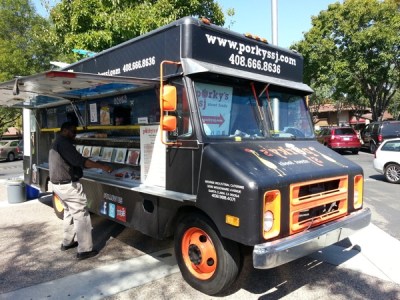
Porky’s SJ serves tasty Korean or Vietnamese-style pork in sandwiches, tacos, or lettuce wraps. Both types of pork are extremely tasty, although I’ll confess a slight preference for the Korean-style. And their tater tots are delicious.
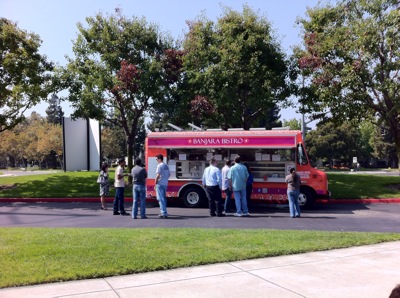
Banjara Bistro serves crepes, sandwiches, and omelets. You can also get the craps as a wrap, which they dub a crep-brito (a name I’ll confess I find deeply amusing and have ordered just to say). Their Southern Style crep-brito is extremely tasty.
One truck which I’m curious to try and am just waiting for a good opportunity is Grilled Cheese Bandits; I’ve been a huge fan of grilled cheese ever since I learned to make it as a kid. And the Mashed Tater Balls look awesome.
One other minor note: many of the trucks accept credit card payments via Square, which is incredibly convenient for those of us who don’t usually bother carrying much cash. Yet another way Square is awesome.
I attended MobileHCI over the weekend and through this afternoon. It was great to catch up with a bunch of folks that I haven’t seen in awhile, and the banquet at the Exploratorium was a blast (I love playing with their exhibits). But I found the content a bit underwhelming. While there were papers I liked, overall I had two issues with much of the work.
One, the research community seems to be confusing statistical significant with significance. Yes, it’s splendid that your new interaction technique is better than existing techniques with p < 0.05. But I hate to break it to the community: the fat finger / occlusion / offscreen information / etc. “problem” isn’t exactly a showstopper for mobile device users, and even if it were a 2 second improvement in task performance won’t Change The World. Microlearning on mobile devices? I can get behind that as tackling a significant problem. Interacting on the back of a phone to avoid your finger getting in the way of what you’re doing? Not so much. But it’s easier to measure impact when you’re tackling small problems, so there was a lot of “small ball”.
Two, there was a lot of work proposing to replace supposedly problematic deterministic techniques with probabilistic techniques (e.g., recognizing position, gestures, orientation, location, etc.). In theory that may sound great: we’ll go beyond old, deterministic 2D techniques like tapping the screen and instead unlock the power of the sensors contained in mobile devices. And when they work the proposed new hotness techniques are better than the old and busted existing techniques. But it’s that caveat that’s the problem: because the new hotness techniques are based on noisy sensors or probabilistic recognition algorithms, they don’t always work. Multiple papers admitted that their proposed approach was either no better than existing approaches because of noisy data or actually fared worse. Other papers substituted deterministic sensors for non-deterministic sensors to try to avoid the problem altogether, but if your solution requires instrumenting the space rather than the phone then it’s not really a mobile solution.
I fully believe that we’re in the midst of a transition from deterministic interaction techniques and algorithms to more probabilistic, non-determine approaches. But rather than pretending that non-determinism doesn’t exist, we need to tackle it head on and think about how well our designs will work when they’re wrong multiple times a day. As a simple example, machine learning researchers are often happy with 85% accuracy rates, but from the user’s perspective that means a system is wrong 1 time out of 6. If it’s a system users employ often, that adds up to a lot of errors. We need more thinking about how to design user experiences that embrace uncertainty and still deliver value to users.
I’ve been increasing the amount of time I carry my Galaxy S3 instead of my iPhone 4, both because I do like the larger display and so that I have a real feeling for the UX for work. But with the release of iOS 6 I shifted back to using my iPhone 4 for awhile to get a sense for the new OS.
Two things struck me after reversing my usage trend. First, the display on the iPhone 4 is still amazing after 2+ years. The display on the S3 is good, but the iPhone 4 display is better. Second, Android apps are still aren’t in the same class as iOS apps. 4-ish years after the release of Android and I still can’t find an RSS reader as good as Reeder or a task management app as good as Things. Carrying my iPhone again really highlighted how I’d shifted some tasks to my tablet instead (which I carry to work largely to use on light rail) because I didn’t have a good app for them on Android. The Android community needs to figure out how to encourage Android developers to raise their game beyond “good enough”.
I have one more observation on the iPhone 4 after briefly swinging by an Apple Store last night to play with the iPhone 5: I actually prefer the solidity of the iPhone 4 to the lighter-weight iPhone 5. The iPhone 5 almost feels too light, which admittedly is a strange complaint about a mobile device.
I’m at least temporarily holding off on buying an iPhone 5. Not because I’m “bored” or “disappointed” by it; I actually think that Apple has once again done an elegant job creating the new iPhone. And I actually appreciate that they’re trying to refine their redesign, rather than completely reinvent it. No, I’m holding off because my iPhone 4 still works great, and since I’ll be able to update it to iOS 6 next week I don’t have a hugely compelling reason to upgrade. Yes, my 2 year old iPhone will be able to run the latest and greatest iOS the day it’s released. Contrast that with my Galaxy S3, which is still running Ice Cream Sandwich 2 months after the release of Jelly Bean (although rumor has it that a Jelly Bean upgrade is pending for October – but possibly not for the US).
I will confess that I’m slightly tempted to upgrade because of the larger screen on the iPhone 5; I do like the 4.8 inch screen on the S3. But these days I split my carrying time between the iPhone and the S3, so I get a larger screen fix half the time. And on weekdays I tend to use my iPad more than their phone because I use it on the light rail to and from work. I may still cave, though, since my wife ordered one (to replace her 3GS) and I may develop tech envy when it arrives. Hi, my name is Jeff, and I have an electronics problem.
Oh, I do feel obligated to note that I actually think the new Lightning (ok, the name (Thunderbolt and Lightning) is groan-inducing) connector is an attractive feature rather than an enormous insult (seriously?). Why? It plugs in either way. I cannot tell you how many times I have struggled to figure out which orientation to use to plug in a microUSB connector. Eliminating that “death of a 1,000 cuts” problem is genius (see how USB devices exist in 4 dimensions).
So no iPhone 5 for me, at least not yet. But I think it looks great. And I’m looking forward to updating my iPhone 4 to iOS 6.
You know how new employees orientations always cover things like benefits, business expenses, corporate policies, and other similar highly entertaining topics? You know what they should really cover? How to effectively and efficiently present in a meeting. Because frankly we don’t seem to be very good at it. In fact, after 10 years in academia and industry, I can’t help but notice that many of us are downright awful. So a few helpful tips for those presenting in meetings.
- If you have N minutes to present and you really can’t present more than N slides. Yes, if you’re doing a flip book animation of your amazing new user experience you can get away with it. But the laws of space and time will not otherwise allow you to present 30 slides in 10 minutes. It’s just not going to happen. Please stop trying.
- If you find yourself saying “let me just quickly show…”, stop immediately and skip whatever you were about to show. It won’t be quick, and you obviously already realize you don’t have enough time. Skip it and move on and next time plan your time better.
- When the people presenting before you run long and you have N/2 minutes to present, resist the urge to try to present all your slides twice as fast. You won’t go twice as fast, and by trying to cram in all your material you’re going to make the next speaker even later. Skip to the highlights and burn the speakers who ate up your time in effigy afterward.
- Do not be the person who complains about other people running over their time when you’re the worst offender. You will just appear clueless and unaware. (No, I am not that person; I have won plaudits for bringing meetings back on time by knowing how to subset my presentations as necessary).
- If you are running a meeting and someone is droning on and on, it is your job to make them finish so the meeting can move forward. If you are unwilling to do so, please don’t run meetings.
Remember, we’re in economically troubled times. Uncle Sam wants you to do your part for workforce productivity by presenting effectively and efficiently. A more efficient, productive company is a more profitable company. A rising tide floats all boats. And any other platitude that will help keep meetings moving. It’s for the children.
 jeff pierce